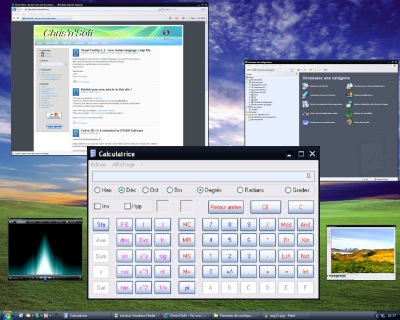
First beta version of Scalable : Download
Unzip the files in a directory, run scalable.exe.
Scalable allow you to make “virtual” windows of real windows application.
The virtual window can be used like the real windows, with keyboard and mouse.
Run for example Notepad.exe or calc.exe (the calculator),
press CTRL key, hold down and click on the minimize button of the window.
Release CTRL key.
You should see a reduced window of notepad ( or calculator ).
Now you can use it with the mouse and keyboard, like the real window.
Hold CTRL key to move it with the mouse ( click anywhere on it ), or just use the title bar like with the real window.
To get the real windows back, just click on the “restore” button (in the title bar of the reduced window) or press escape key.
( if you lost the real window,right click on the taskbar button of the window, choose “Move” and press arrows keys, the window should appears…)
This is still a beta version, so a lot of programs doesn’t works with mouse and keyboard. The reduced menu doesn’t work.
10 replies on “Project Scalable, beta version”
Une petite fenêtre d’avertissement indique l’impossibilité de charger Scalable.dll lorsque je double-clique sur Scalable.exe
Pensez a bien extraire tout le zip dans un répertoire réél ( ex: c:\scalable ).
Ne pas lancer scalable.exe a partir du zip mais a partir du répertoire réél.
( c’est vrai que maintenant sous XP et Vista on ne voit plus trop la difference entre dossier compressé et dossier réél… )
Super !!
C’est bien pensé , faut continuer , ca peut etre tres pratique !!
Nice Idea, but i doesn´t work with Styler Toolbar; there is a black field instead of the Toolbar
This is really cool! It works great, and I can already see how it will help me organize my desktop in the future! 😉
I love this ! The only thing is that it don’t work with Actual Title Buttons, but I bet it will be solved in the future… Keep it up the good work !!
“Unable to load Scalable.dll” ………..What can be?
unzip the file downloaded in a directory.
When you open a zip file with windows, it doesn’t extract all the file if you click on the .exe so scalable can’t find the dll.
scalable, thats give me a idea of an scalable full funcionally desktop, example:a screen runin an application with the size of 1080p or 720p with an adjust to 1024×600
This works on Windows 8.1!